Windows desktop · Free · MIT licensed

Open the file. Interrogate it. Fix it. Never upload it.

Hip Hip Parquet opens Parquet, CSV, JSON and Excel files, runs real SQL across them with DuckDB, scores their quality across four dimensions, and lets you correct problems in the grid and save back — all on your own machine, with no account and no service behind it.

Installer or portable zip · 64-bit · SHA-256 checksums published with every release

No account No cloud service No telemetry endpoint Source is MIT Windows 10 build 19041+
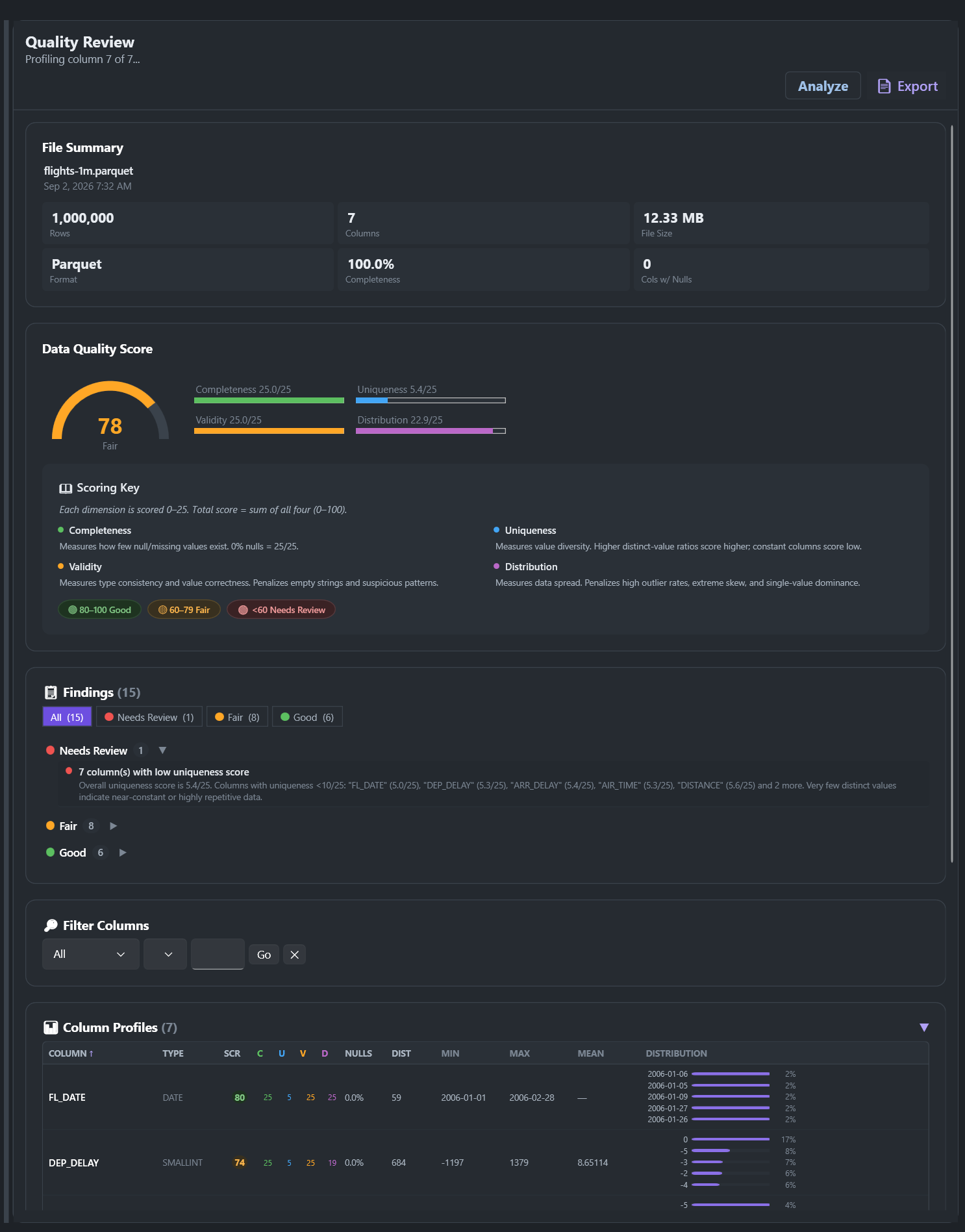
The Hip Hip Parquet workspace: schema explorer on the left, Query Hub running DuckDB SQL over a registered alias, a one-million-row data grid, and the Quality Review panel scoring the file 78 out of 100 with fifteen findings.

flights-1m.parquet · 1,000,000 rows · 7 columns · 12.33 MB · scored 78/100 with 15 findings · nothing uploaded
The three bad options

You have a file. You need to know what's in it. Today that means one of these.

Open it in Excel

Except Parquet needs a Power Query detour before it will open at all, your IDs and dates get silently reformatted on the way in, and the whole thing gives up at 1,048,576 rows.

Cost: wrong answers you won't notice

Paste it into an online viewer

Fast, right up until you remember the file has customer records in it and you just handed it to a server you've never heard of.

Cost: a conversation with your security team

Write a throwaway notebook

Spin up a kernel, import pandas, guess at the encoding, print the head, discover the schema drifted, start again.

Cost: twenty minutes, every single time

Hip Hip Parquet is the fourth option: double-click the file and get on with your day.

What it does

Four things, done properly, in one window

No pipeline to configure, no service to stand up, no notebook to babysit. Open, question, judge, repair.

Opens the file you actually have

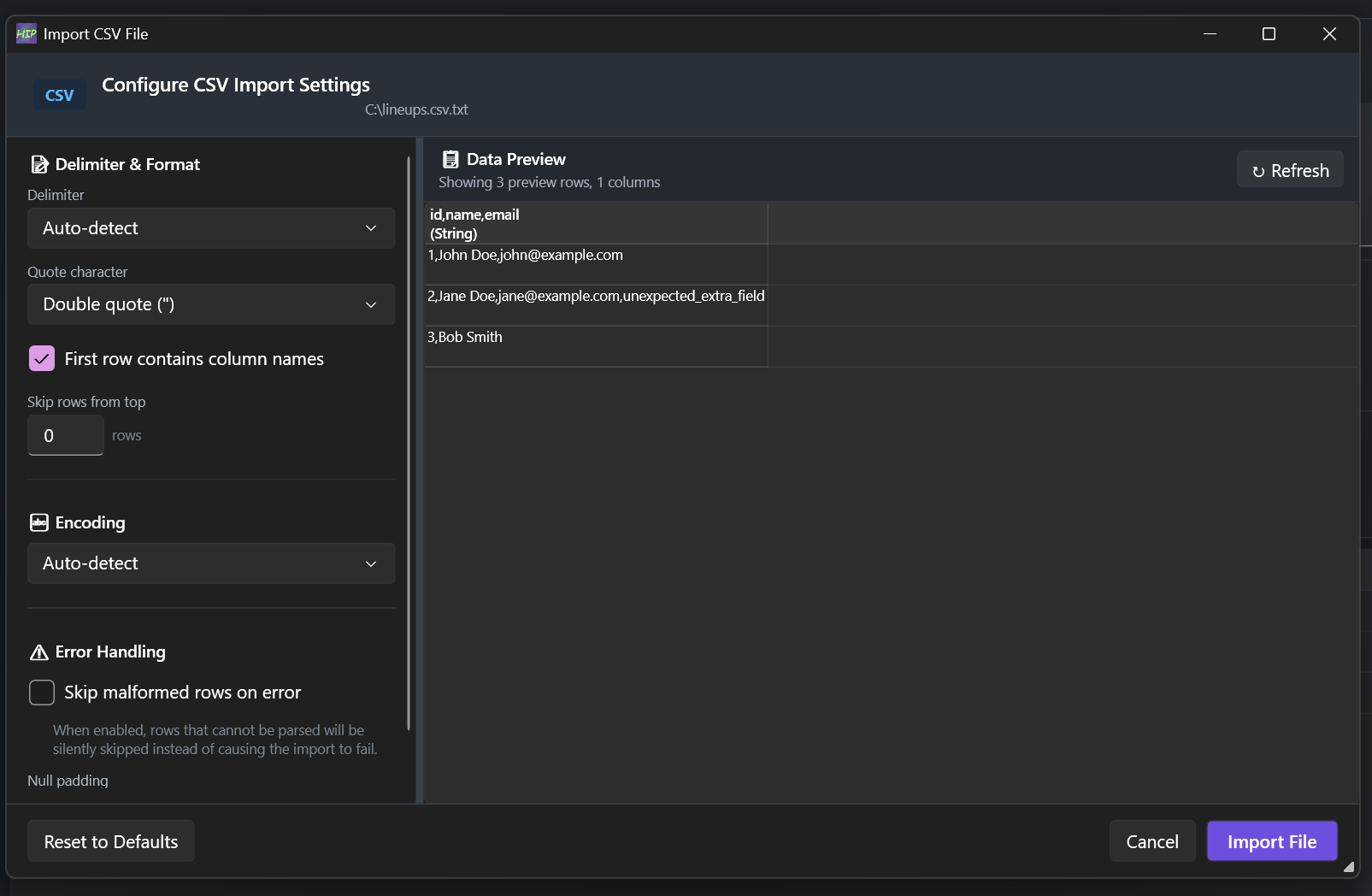
Drag it onto the window, pick it from recent files, or pass it as a command-line argument. Sharded and multi-part Parquet gets stitched into one logical table automatically. CSV and JSON get an import dialog first, so you set the delimiter and encoding before anything is guessed wrong.

  • 50,000 rowsper page, so a million-row file opens now instead of after a coffee
  • .snappy.parquetrecognised, along with split and sharded Parquet directories
  • encodingdetected on CSV import, with an options dialog to override it
  • workspacerestored on startup — the file, the panes, the sizes, where you left off
Import options — lineups.csv.txt
The Import CSV File dialog: delimiter and encoding both set to auto-detect, double quote as the quote character, first row treated as column names, a skip-malformed-rows option, and a live data preview showing three parsed rows alongside the settings.

Ask it a real question, in SQL

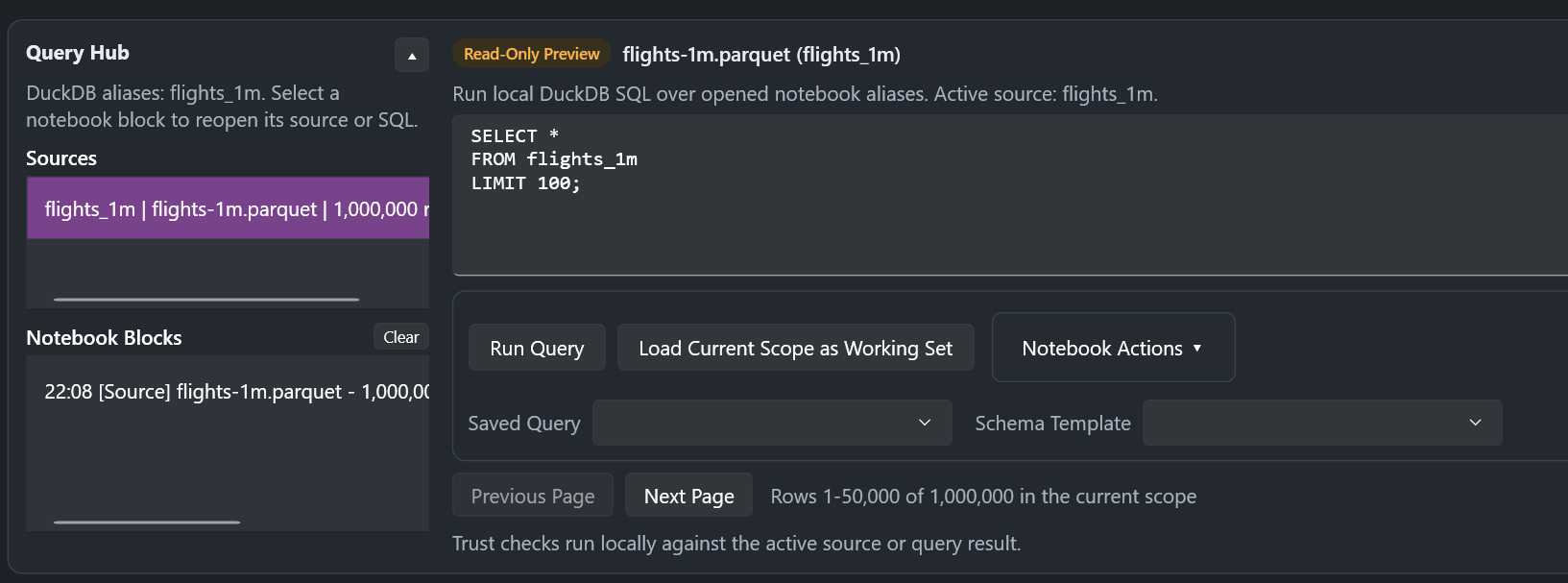
The Query Hub sits above the grid and runs DuckDB against your opened files. Register them as named aliases and join across them. Results open as a read-only preview; Load Current Scope as Working Set promotes them to the thing you're editing. Queries you run often get saved by name, and every step lands as a notebook block you can reopen or clear.

  • DuckDBstandard SQL over local files — no import step, no database to run
  • aliasesregister several files at once and query across them together
  • one clickchecks for nulls and empties, duplicates, and regex pattern matches
  • templatessave a schema from a known-good file and validate incoming files against it
Query Hub — flights_1m registered
The Query Hub with flights_1m registered as a DuckDB alias, a SELECT star FROM flights_1m LIMIT 100 query in the editor, and a read-only preview paging rows 1 to 50,000 of 1,000,000.

Find out whether the data is any good

Completeness, uniqueness, validity and distribution are each scored 0–25 and summed into a single number out of 100, banded Good, Fair, or Needs Review. Every finding is triaged the same way, so you read the one that says DEP_DELAY has 120,804 outliers, 12.1%, beyond 1.5×IQR before the six that say everything is fine.

  • 0–100four dimensions at 0–25 each — you can see exactly which one cost you the points
  • triagedfindings split into Needs Review, Fair and Good instead of one flat list
  • per columnnull rate, distinct count and ratio, outlier rate, value distribution
  • HTML reportexported as a single self-contained file you can send to someone
Quality review — 1,000,000 rows
The Quality Review panel scoring flights-1m.parquet 78 out of 100: Completeness 25/25, Validity 25/25, Distribution 22.9/25, Uniqueness 5.4/25, with 15 findings triaged into 1 Needs Review, 8 Fair and 6 Good, above the per-column profile table.

Fix it here, not somewhere else

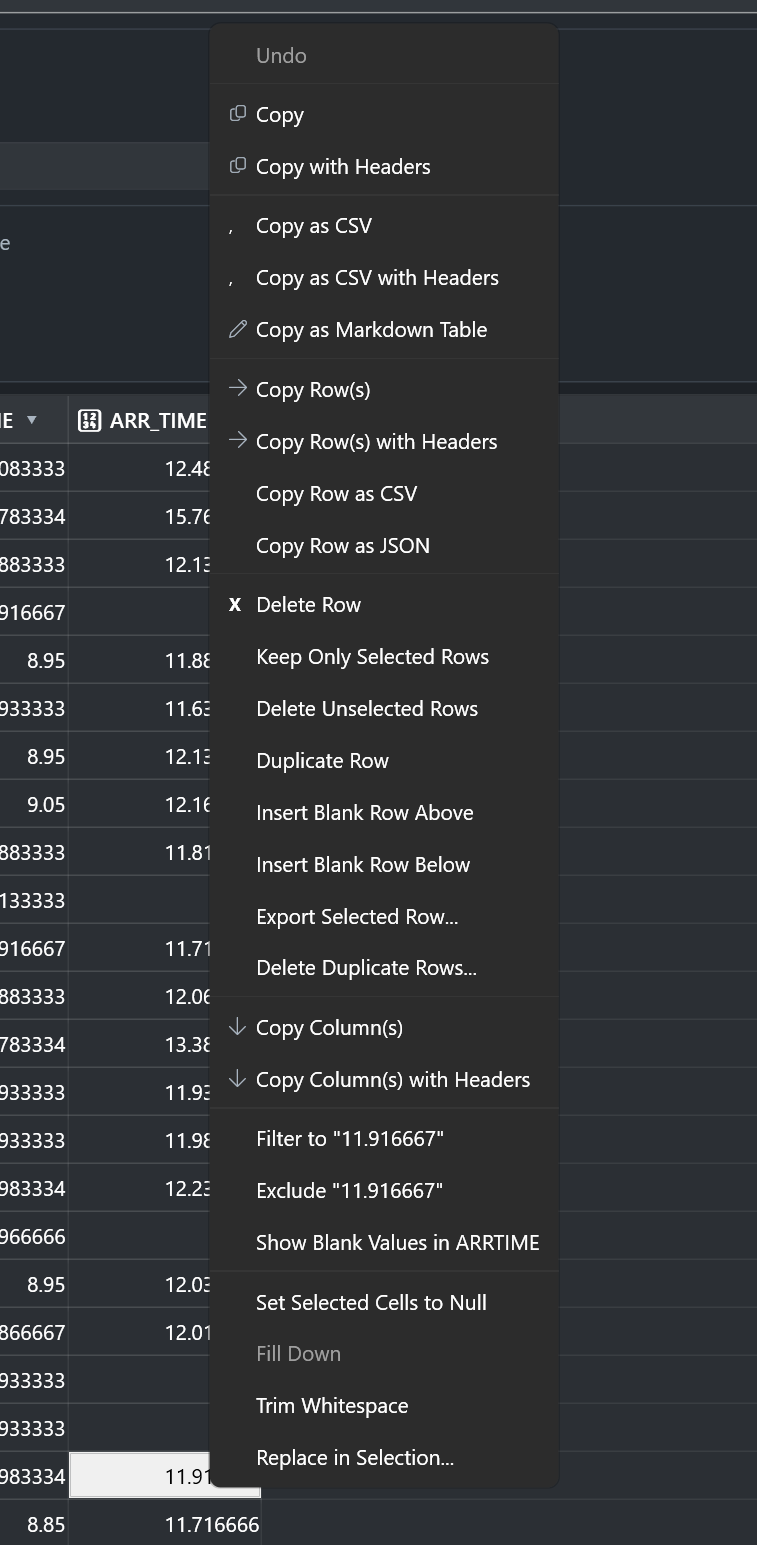
Most tools show you the problem and leave you to go solve it elsewhere. Here you edit cells inline, fill down, trim whitespace, set to null, find and replace inside a selection, deduplicate, delete or keep only the rows you selected. A pending-changes badge tracks unsaved edits; Ctrl+Z undoes the last one. Save back to the original file, or export to a different format entirely.

  • in placedouble-click a cell and type — an opened file is editable, not a read-only view
  • row opsdelete, duplicate, insert blank, keep only selected, deduplicate
  • 8 copy formatsCSV, TSV, Markdown table, row-scoped JSON, with or without headers
  • convertopen a CSV, save a Parquet — Save As and Export As cross formats
Right-click menu — row and cell operations
The data grid's right-click menu: copy plain, with headers, as CSV, as CSV with headers or as a Markdown table; row-scoped copies including Copy Row as JSON; row operations such as Delete Row, Keep Only Selected Rows, Duplicate Row, Insert Blank Row and Delete Duplicate Rows; and cell actions including Set Selected Cells to Null, Trim Whitespace and Replace in Selection.
Formats

Read and write, spelled out

Because "supports Excel" is the kind of claim you find out is only half true at the worst possible moment.

FormatReadWrite
.parquet · .pqt✓ Yes✓ Yes
Snappy-compressed Parquet✓ Yes✓ Yes
Split / sharded Parquet✓ Yes✓ Yes
.csv · .tsv · .tab✓ Yes✓ Yes
.json · .jsonl · .ndjson✓ Yes✓ Yes
.xlsx✓ Yes✓ Yes
.xls✓ Yes— Read only
Also in the box

The parts that make it a tool you keep open

Schema explorer

Every column and inferred type in a side pane. Search by name or type, click to jump the grid there, copy the whole schema out.

Named views

Save a filter, search, sort and column-visibility combination under a name and reapply the whole configuration in one click.

Workspace snapshots

Pane sizes, visibility, the active file — captured and restorable, so Monday morning looks like Friday afternoon.

Per-column filters

Narrow to values, exclude values, or isolate blanks. Filter state survives a reload, and clears from the status bar.

Markdown helper

An editor with live preview, embedded beside the grid or popped out to its own window. Your notes stay next to the data.

Fluent theming

Light, dark, and system-tracked. It looks like a Windows app because it is one — WPF, not a browser in a costume.

Jump List

Recent files on the taskbar, plus taskbar progress while a long load or analysis runs.

File summary

Rows, columns, file size, format, completeness and columns-with-nulls, on one card before you read a single value.

Keyboard

Built for people who don't reach for the mouse

Ctrl + OOpen file
Ctrl + SSave
Ctrl + ZUndo last edit
Ctrl + FGlobal search
Ctrl + GGo to row
Ctrl + CCopy selection
Ctrl + Alt + CCopy selection as CSV
Ctrl + Shift + CCopy selection as TSV
F1Shortcut reference
Stays local

Not a promise. An architecture.

Plenty of tools say your data is safe with them. This one has nowhere to send it — there is no backend, no account system, and nothing in the app that opens a socket to a service. If that matters for the files you work with, you can verify all of it yourself.

Download · v1.13.2

Two ways in

Installer

Download and run it. There is no second step.

HipHipParquet-1.13.2-Setup.exe

Download installer

Portable

Extract anywhere and run HipHipParquet.exe. Nothing is written to the registry, no admin rights needed.

HipHipParquet-1.13.2-Portable.zip

Download portable zip
OS  Windows 10 build 19041 or later, 64-bit Runtime  .NET 8 Desktop Runtime Licence  MIT Price  Free
Questions

Before you download

Is any of my data sent anywhere?

No. There is no backend service, no account system, and no upload step anywhere in the workflow. Files are read from disk, processed in the local application, and written back to disk. The source is MIT licensed if you want to confirm that yourself.

Is there a Mac or Linux build?

Not today. It's a WPF application, which is Windows-only. If a cross-platform build matters to you, say so in the issue tracker — that's the signal that decides what gets built next.

How large a file can it handle?

Data loads in batches of 50,000 rows, with more loaded on demand or all at once, so the window stays responsive on files far larger than memory-at-once tools can manage. Querying goes through DuckDB, which is built for exactly this.

Do I need to install anything else?

The .NET 8 Desktop Runtime, if it isn't already on the machine. The installer page links to it directly.

Is it really free? What's the catch?

It's free and MIT licensed, with no paid tier and no plans to add one. If it saves you time, sponsoring the project on GitHub is the way to keep it moving — but nothing is gated behind that.

Can I use it on customer or regulated data?

That's the case it was built for. Everything stays on the machine, the portable build needs no admin rights or registry access, releases ship with SHA-256 checksums, and the full source is available for review by whoever has to approve new software where you work.

Is this a database, or a replacement for my warehouse?

Neither. It's for the step before and after those: understanding a file you've been handed, checking a file you're about to load, and fixing the small problems that don't justify a pipeline change.

Found it useful?

Starring the repo is the cheapest way to help someone else with the same problem find it — and issues and feature requests genuinely shape what ships next.